pygeoapi implementation kubernetes - étape 3 - publication d'un service OGC process
Table of Contents
Introduction
pygeoapi kubernetes series introduction
Publication d’un service OGC process
Dans ce nouveau chapitre nous allons développer et publier deux services de type OGC process.
Documents de référence:
- https://medium.com/geobeyond/create-ogc-processes-in-pygeoapi-11c0f7d3be61
- https://docs.pygeoapi.io/en/latest/publishing/ogcapi-processes.html#publishing-processes-via-ogc-api-processes
- https://docs.pygeoapi.io/en/0.12.0/data-publishing/ogcapi-processes.html
- https://dive.pygeoapi.io/publishing/ogcapi-processes/
Concepts de base
Pygeoapi repose sur une architecture orientée plugin qui permet d’interfacer du code python existant et de l’exposer en tant que process service. Le code peut être un package python autonome, il requière seulement une ou plusieurs “interfaces” implementant la classe BaseProcessor de pygeoapi. Ce que nous allons faire dans la suite de ce chapitre.
Creation du package python
L’ensemble du code est disponible depuis ce repo github.
Nous allons prendre ici l’exemple de deux services:
- valider le format d’un geojson
- valider les géometries d’un geojson
Ce package s’appuie sur pydantic-geojson et shapely.
Code initial
Le code initial est un package python standard :
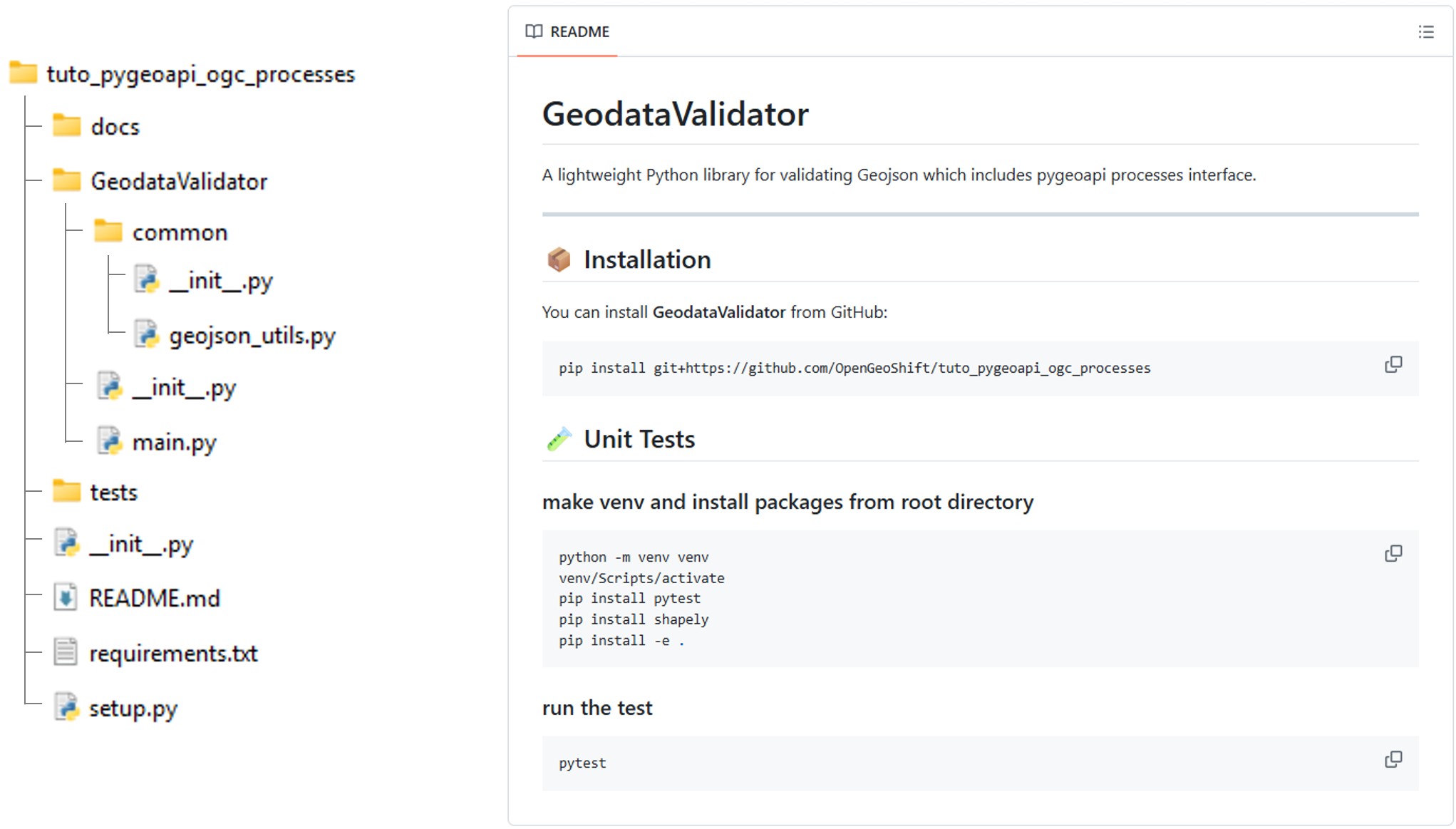
Le fichier setup.py décrit l’installation du package et de ses dépendances.
setup.py
from setuptools import find_packages, setup

with open("README.md", "r", encoding="utf-8") as fh:
    long_description = fh.read()

with open("requirements.txt", "r", encoding="utf-8") as fh:
    requirements = fh.read().splitlines()

setup(
    name='GeodataValidator',
    version='0.1.0',
    author='OpenGeoShift',
    author_email='contact@opengeoshift.com',
    license='UNLICENSED',
    description='GeodataValidator is a Python package to validate geospatial data',
    long_description=long_description,
    long_description_content_type="text/markdown",
    packages=find_packages(),
    test_suite='tests',
    python_requires='>=3.6',
    install_requires=requirements,
    tests_require=['pytest'],
    classifiers=[
        'Development Status :: 3 - Alpha',
        'Intended Audience :: Developers',
        'Topic :: Software Development :: Libraries :: Python Modules',
        'License :: OSI Approved :: MIT License',
        'Programming Language :: Python :: 3.6',
        'Operating System :: OS Independent',

    ]
)
Le fichier main.py contient les deux fonctions principales des deux services. Ces fonctions s’appuient sur le module common.geojson_utils.
main.py
import logging
import time

from GeodataValidator.common.geojson_utils import GeoJsonUtils

logging.basicConfig(level=logging.INFO)
LOGGER = logging.getLogger(__name__)

gjutils = GeoJsonUtils()

def validate_geojson_format(geojson: dict)->bool:
    """
    Validate geojson structure
    """
    LOGGER.info('Validating GeoJSON Format...')
    return gjutils.geojson_isvalid(geojson)

def validate_geojson_geometry(geojson: dict)->bool:
    """
    Validate geojson geometry
    """
    LOGGER.info('Validating GeoJSON Geometry...')
    return gjutils.validate_geojson_geometry(geojson)

if __name__ == "__main__":

    geojson = {"features":[{"geometry":{"coordinates":[[[9.4001,4.1678],[9.4001,4.1562],[9.4117,4.1562],[9.4117,4.1677],[9.4001,4.1678]]],"type":"Polygon"},"properties":{},"type":"Feature"}],"type":"FeatureCollection"}

    geojson_validation_result = validate_geojson_format(geojson)
    if not geojson_validation_result:
        LOGGER.error("☒ Invalid GeoJSON Format")
    LOGGER.info("☑ Valid Geojson Format")

    geometry_validation_result = validate_geojson_geometry(geojson)
    if not geometry_validation_result:
        LOGGER.error("☒ Invalid GeoJSON Geometry")
    LOGGER.info("☑ Valid Geojson Geometry")
common.geojson_utils
import logging
from pydantic_geojson import FeatureCollectionModel
from pydantic import ValidationError
from shapely.geometry import shape
from shapely.validation import explain_validity

LOGGER = logging.getLogger(__name__)

class GeoJsonUtils:

    def geojson_isvalid(self, geojson: dict) -> bool:

        try:
            FeatureCollectionModel(**geojson)
            return True
        except ValidationError as e:
            LOGGER.error(e)
            return False

    def validate_geojson_geometry(self, geojson: dict) -> bool:

        all_valid = True

        for idx, feature in enumerate(geojson.get("features", [])):

            geom = feature.get("geometry")

            if geom is None:
                LOGGER.warning(f"Feature {idx}: missing geometry")
                all_valid = False
                continue

            shapely_geom = shape(geom)

            if not shapely_geom.is_valid:
                LOGGER.error(f"Feature {idx}: invalid geometry")
                LOGGER.error(f"  Reason: {explain_validity(shapely_geom)}")
                all_valid = False

        return all_valid
Interface pygeoapi
Afin de permettre a pygeoapi d’executer les fonctions validate_geojson_format et validate_geojson_format il faut créer une interface qui instancie pygeoapi BaseProcessor et va executer le code du package:
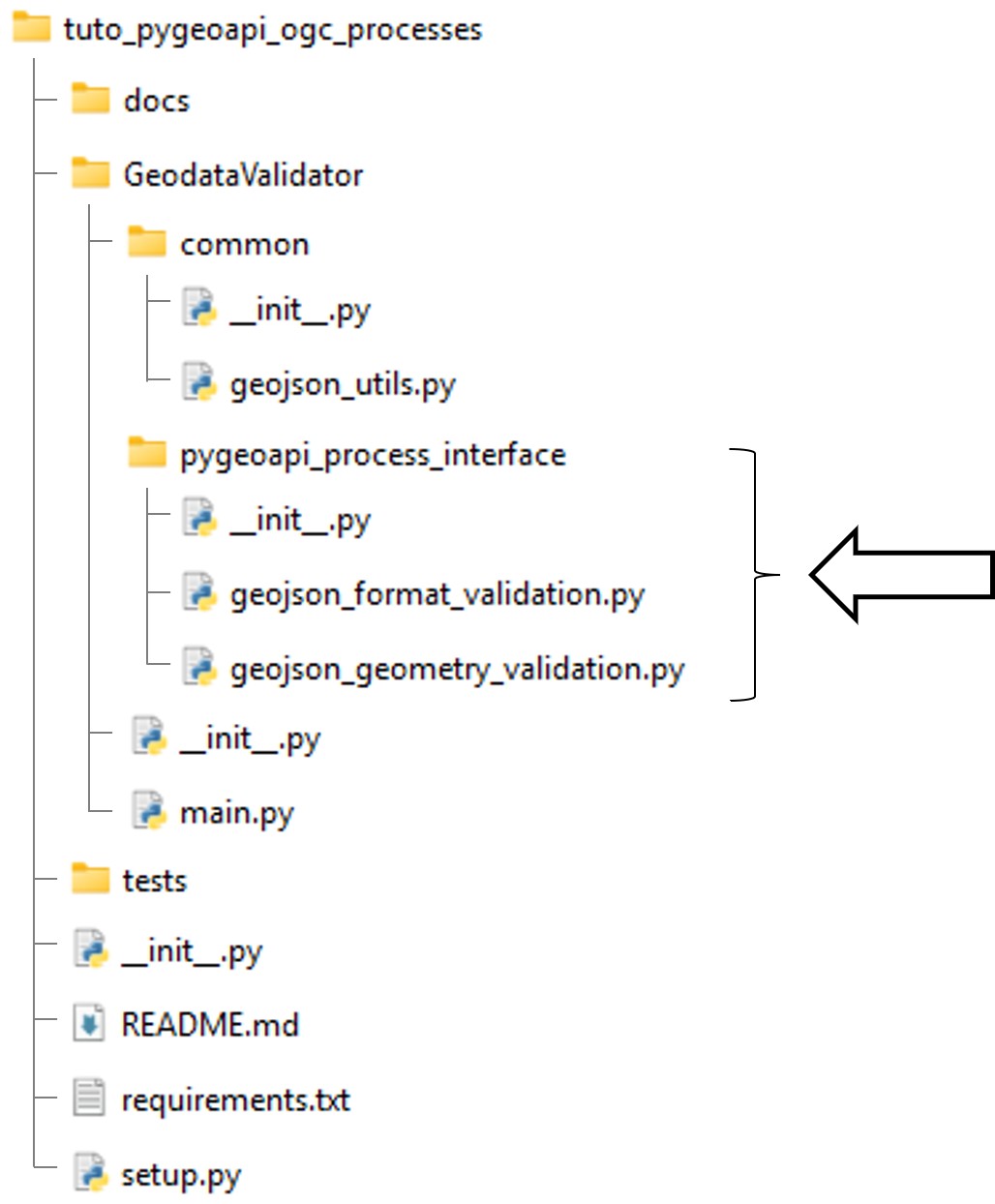
pygeoapi_process_interface.geojson_format_validation.py
from pygeoapi.process.base import BaseProcessor, ProcessorExecuteError
from GeodataValidator import main

#: Process metadata and description
PROCESS_METADATA = {
    'version': '0.2.0',
    'id': 'geojson-format-validation',
    'title': {
        'en': 'geojson-format-validation',
        'fr': 'geojson-format-validation'
    },
    'description': {
        'en': 'Validate geojson format',
        'fr': 'Validation format geojson',
    },
    'jobControlOptions': ['sync-execute', 'async-execute'],
    'keywords': ['geojson', 'format', 'validation'],
    'links': [{
        'type': 'text/html',
        'rel': 'about',
        'title': 'information',
        'href': 'https://example.org/process',
        'hreflang': 'en-US'
    }],
    'inputs': {
        'geojson': {
            'title': 'Geojson',
            'description': 'Geojson',
            'schema': {
                'type': 'object',
                'contentMediaType': 'application/json'
            },
            'minOccurs': 1,
            'maxOccurs': 1,
            'keywords': ['geojson']
        }
    },
    'outputs': {
        'is_valid': {
            'title': 'Is geojson format valid',
            'description': 'Is the geojson format provided valid',
            'schema': {
                'type': 'boolean'
            }
        }
    },
    'example': {
        'inputs': {
            'geojson': {"type":"FeatureCollection","features":[{"type":"Feature","properties":{},"geometry":{"coordinates":[[[9.4001,4.1678],[9.4001,4.1562],[9.4117,4.1562],[9.4117,4.1677],[9.4001,4.1678]]],"type":"Polygon"}}]},
        }
    }
}


class GeoJsonFormatValidatorProcessor(BaseProcessor):
    """Processor example"""

    def __init__(self, processor_def):
        """
        Initialize object

        :param processor_def: provider definition

        :returns: pygeoapi.process.geojson_format_validation.GeoJsonFormatValidatorProcessor
        """

        super().__init__(processor_def, PROCESS_METADATA)
        self.supports_outputs = True

    def execute(self, data, outputs=None):
        mimetype = 'application/json'
        geojson = data.get('geojson')

        if geojson is None:
            raise ProcessorExecuteError('Cannot process without a geojson')

        try:
            is_valid = main.validate_geojson_format(geojson)
            outputs = {"is_valid": is_valid}

        except Exception:
            raise

        return mimetype, outputs

    def __repr__(self):
        return f'<GeoJsonFormatValidatorProcessor> {self.name}'
pygeoapi_process_interface.geojson_geometry_validation.py
from pygeoapi.process.base import BaseProcessor, ProcessorExecuteError
from GeodataValidator import main

#: Process metadata and description
PROCESS_METADATA = {
    'version': '0.2.0',
    'id': 'geojson-geometry-validation',
    'title': {
        'en': 'geojson-geometry-validation',
        'fr': 'geojson-geometry-validation'
    },
    'description': {
        'en': 'Validate geojson geometries',
        'fr': 'Validation geojson geometries',
    },
    'jobControlOptions': ['sync-execute', 'async-execute'],
    'keywords': ['geojson', 'geometry', 'validation'],
    'links': [{
        'type': 'text/html',
        'rel': 'about',
        'title': 'information',
        'href': 'https://example.org/process',
        'hreflang': 'en-US'
    }],
    'inputs': {
        'geojson': {
            'title': 'Geojson',
            'description': 'Geojson',
            'schema': {
                'type': 'object',
                'contentMediaType': 'application/json'
            },
            'minOccurs': 1,
            'maxOccurs': 1,
            'keywords': ['geojson']
        }
    },
    'outputs': {
        'is_valid': {
            'title': 'Is geojson geometry valid',
            'description': 'Is the geojson geometry provided valid',
            'schema': {
                'type': 'boolean'
            }
        }
    },
    'example': {
        'inputs': {
            'geojson': {"type":"FeatureCollection","features":[{"type":"Feature","properties":{},"geometry":{"coordinates":[[[9.4001,4.1678],[9.4001,4.1562],[9.4117,4.1562],[9.4117,4.1677],[9.4001,4.1678]]],"type":"Polygon"}}]},
        }
    }
}


class GeoJsonGeometryValidatorProcessor(BaseProcessor):
    """Processor example"""

    def __init__(self, processor_def):
        """
        Initialize object

        :param processor_def: provider definition

        :returns: pygeoapi.process.geojson_geometry_validation.GeoJsonGeometryValidatorProcessor
        """

        super().__init__(processor_def, PROCESS_METADATA)
        self.supports_outputs = True

    def execute(self, data, outputs=None):
        mimetype = 'application/json'
        geojson = data.get('geojson')

        if geojson is None:
            raise ProcessorExecuteError('Cannot process without a geojson')

        try:
            is_valid = main.validate_geojson_geometry(geojson)
            outputs = {"is_valid":is_valid}

        except Exception:
            raise

        return mimetype, outputs

    def __repr__(self):
        return f'<GeoJsonGeometryValidatorProcessor> {self.name}'
Installation du package et configuration du déploiement du service
Installation du package
Afin de rendre le package accessible durant le déploiement de pygeoapi, l’idéal est de le publier dans un artifactory repository manager. L’objectif de cette démo est de comprendre l’architecture plugin de pygeoapi, nous utiliserons donc simplement la capacité de pip d’installer un package directement depuis un repo git.
Le package sera installé en créant une image Docker dérivée de geopython/pygeoapi:latest, dans laquelle Git est ajouté ainsi que la commande d’installation du package lui-même.
Dans le dossier pygeoapi, ajouter un Dockerfile:
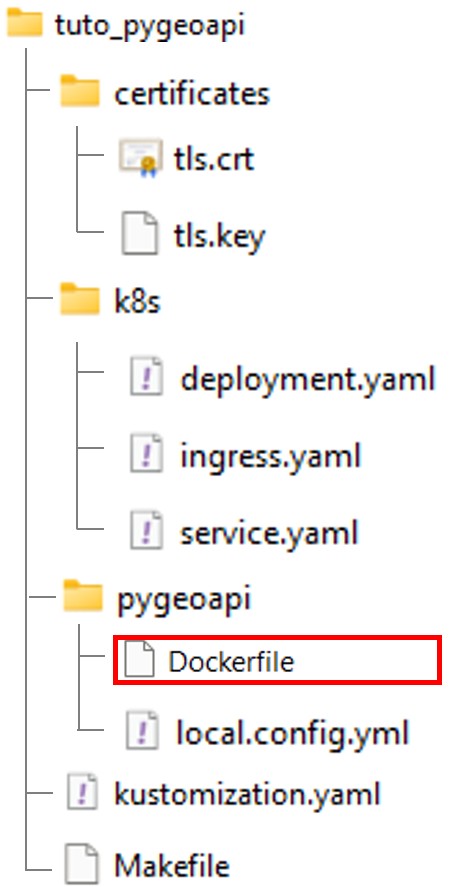
Dockerfile
FROM geopython/pygeoapi:latest

RUN apt-get update \
    && apt-get install -y --no-install-recommends git \
    && rm -rf /var/lib/apt/lists/* \
    && python3 -m pip install git+https://github.com/OpenGeoShift/tuto_pygeoapi_ogc_processes
Construction de l’image
Modifier le fichier Makefile afin d’y include une étape de build.
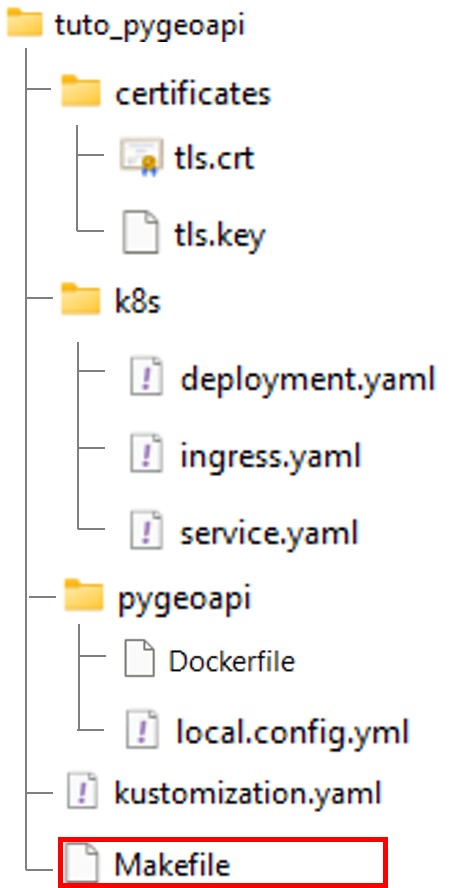
Makefile
IMAGE_NAME = ogs-pygeoapi
TAG ?= 1.0.0

FULL_IMAGE = $(IMAGE_NAME):$(TAG)

MINIKUBE_DOCKER = eval $$(minikube docker-env)

build:
	$(MINIKUBE_DOCKER) && docker build -t $(FULL_IMAGE) -t $(IMAGE_NAME):latest ./pygeoapi

deploy:
	kubectl apply -k .

clean:
	kubectl delete -k .
Dans le contexte mnikube, MINIKUBE_DOCKER permet de construire l’image dans le docker de minikube au lieu du docker par default en local.
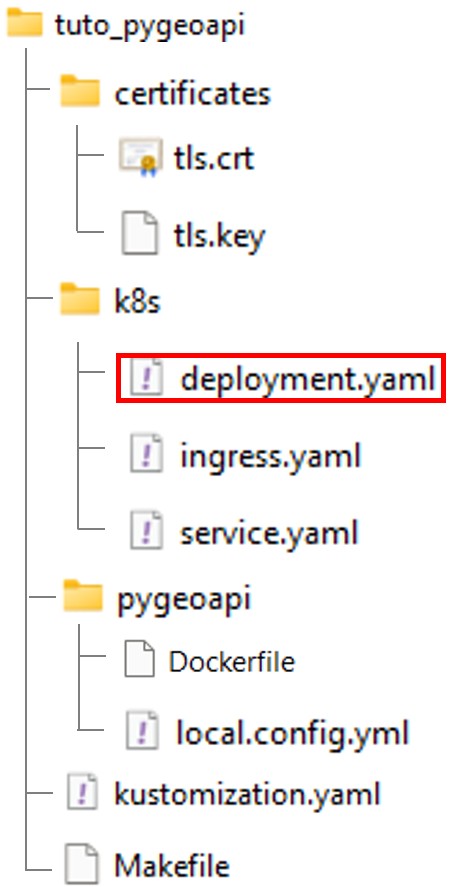
Modifier ensuite le fichier deployment.yaml enfin que le container prenne en compte la nouvelle image.
apiVersion: apps/v1
kind: Deployment
metadata:
  name: pygeoapi
  namespace: default
spec:
  replicas: 1
  selector:
    matchLabels:
      app: pygeoapi
  template:
    metadata:
      labels:
        app: pygeoapi
    spec:
      containers:
      - name: pygeoapi
        image: ogs-pygeoapi:latest # <-- new image
        imagePullPolicy: IfNotPresent
        ports:
        - containerPort: 80
        volumeMounts:
        - name: config-volume
          mountPath: /pygeoapi/local.config.yml
          subPath: local.config.yml

      volumes:
      - name: config-volume
        configMap:
          name: pygeoapi-config
Ajout du plugin via le fichier de configuration de pygeoapi
Editez le fichier local.config.yml
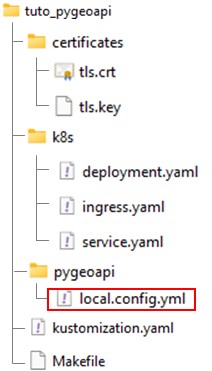
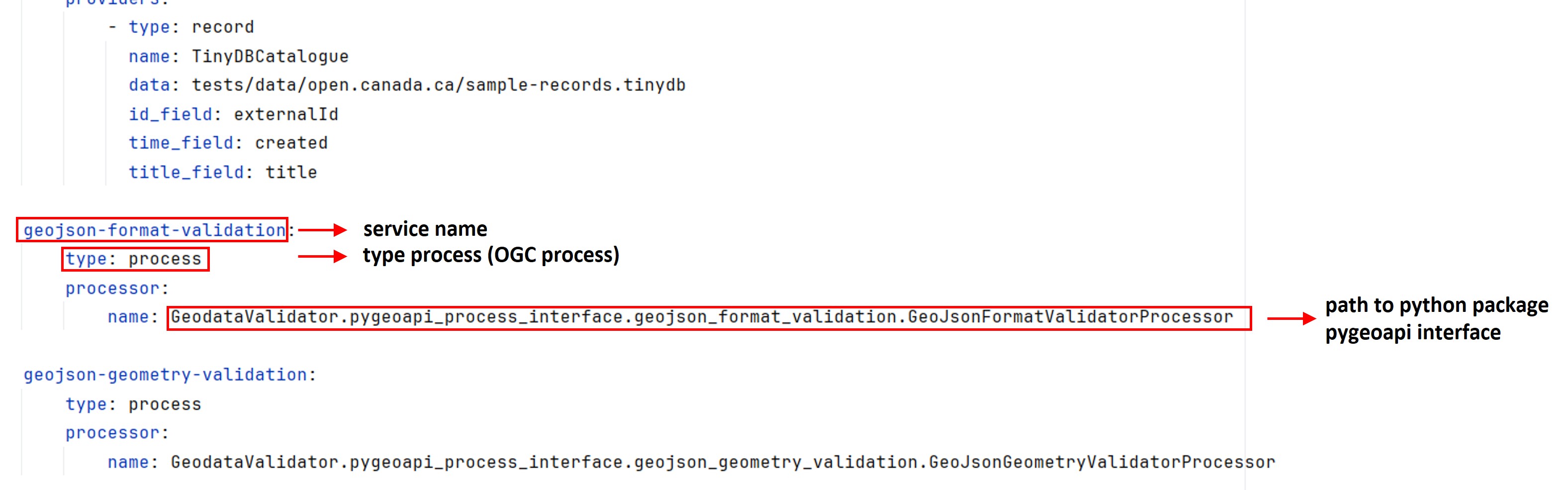
Ajouter les lignes suivantes à la fin du fichier:
local.config.yml
# ....

geojson-format-validation:
    type: process
    processor:
        name: GeodataValidator.pygeoapi_process_interface.geojson_format_validation.GeoJsonFormatValidatorProcessor

geojson-geometry-validation:
    type: process
    processor:
        name: GeodataValidator.pygeoapi_process_interface.geojson_geometry_validation.GeoJsonGeometryValidatorProcessor
Déploiement du service
Depuis une invite de commande (activer WSL sous Windows).
wsl -d ubuntu
Construction de l’image
$ cd /path-to-tuto-folder/
$ make build
$ make build
eval $(minikube docker-env) && docker build -t ogs-pygeoapi:1.0.0 -t ogs-pygeoapi:latest ./pygeoapi
failed to fetch metadata: fork/exec /usr/local/lib/docker/cli-plugins/docker-buildx: no such file or directory

DEPRECATED: The legacy builder is deprecated and will be removed in a future release.
            Install the buildx component to build images with BuildKit:
            https://docs.docker.com/go/buildx/

Sending build context to Docker daemon   12.8kB
Step 1/2 : FROM geopython/pygeoapi:latest
 ---> 4b4e27875671
Step 2/2 : RUN apt-get update     && apt-get install -y --no-install-recommends git     && rm -rf /var/lib/apt/lists/*     && python3 -m pip install git+https://github.com/OpenGeoShift/tuto_pygeoapi_ogc_processes
 ---> Using cache
 ---> d4057d561b87
Successfully built d4057d561b87
Successfully tagged ogs-pygeoapi:1.0.0
Successfully tagged ogs-pygeoapi:latest
Déploiement
$ make clean # <-- delete existing service
$ make deploy
$ make deploy
kubectl apply -k .
configmap/pygeoapi-config-295hc5kh4g created
service/pygeoapi created
deployment.apps/pygeoapi created
ingress.networking.k8s.io/pygeoapi-ingress created
Dans le contexte WSL, réaciver le tunnel si nécessaire:
$ minikube tunnel
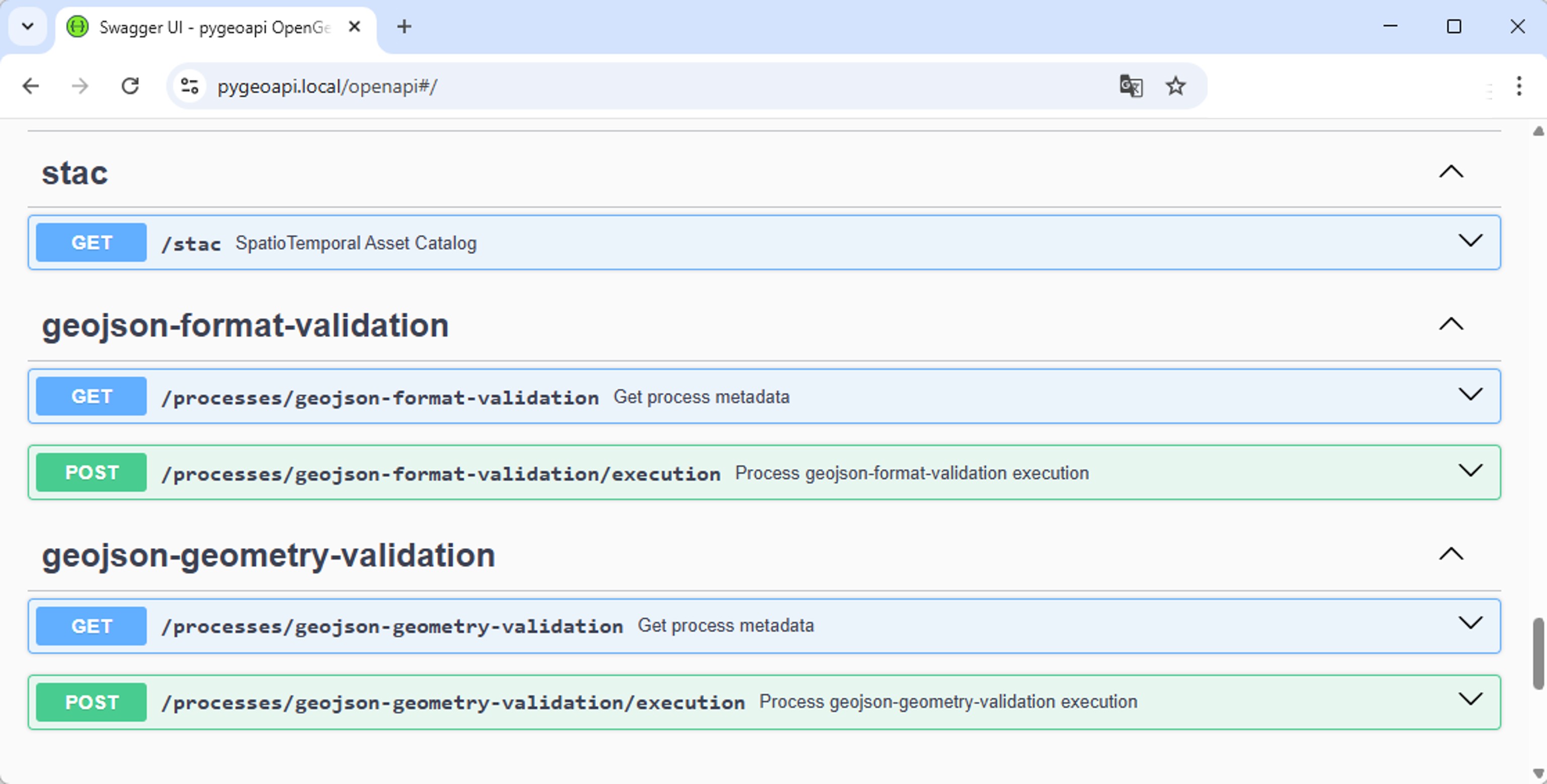
Tester le service
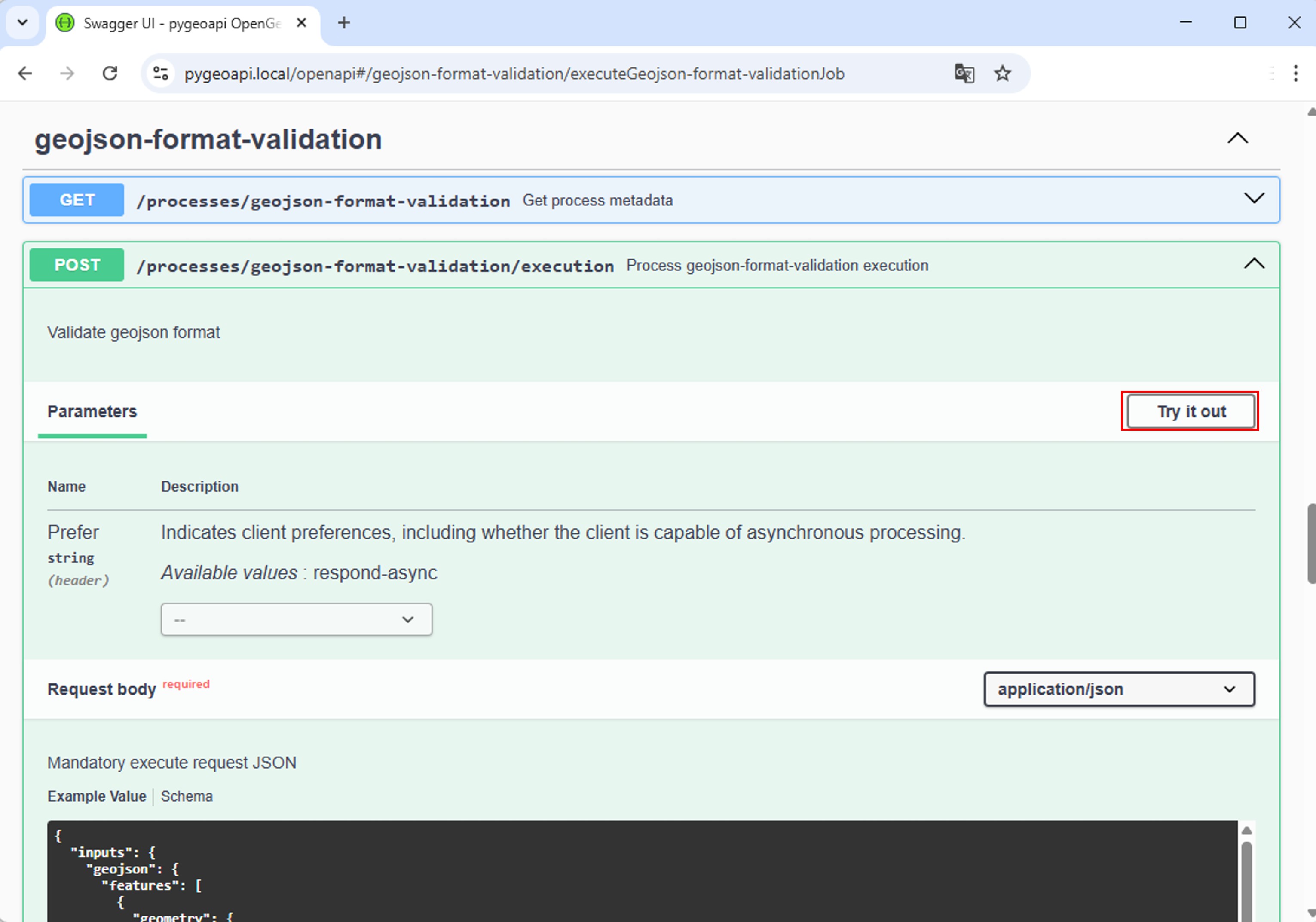
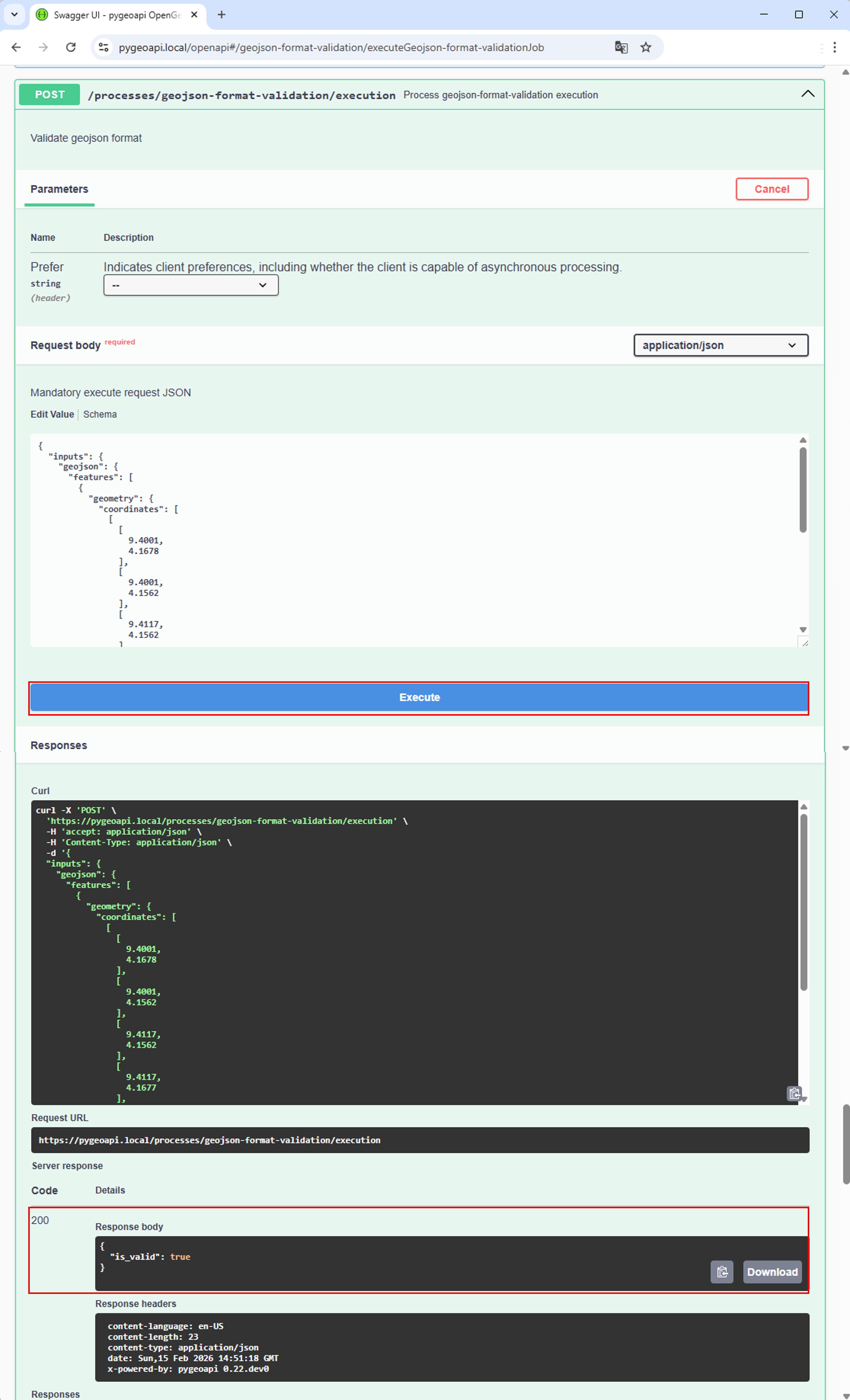
Conclusion
N’importe quel package python peut etre converti en service OGC processes en se basant sur l’architecture plugin de pygoeapi, il suffit pour cela de créer des “interfaces” implementant la classe BaseProcessor de pygeoapi.